This feature is in alpha. It is off by default. Turn it on under Settings > Experimental. Expect rough edges, and keep your own backups of anything irreplaceable.
What problem it solves
Once Projects is on, Kamembert can treat a pile of copied folders as one project with a history. It reads the version numbers out of each copy, works out which copy came from which, draws the line of versions as a graph, and gives you safe ways to shrink the old ones without losing them.
Collections: how versions are grouped
A collection is one folder whose direct sub-folders are each a version of the same project. You point Kamembert at the parent folder with Mark a folder as a versioned project, and each sub-folder becomes a version.
MyGame/                   the folder you mark (the collection)
├─ MyGame v1/             a version
├─ MyGame v2/             a version
├─ MyGame backup final/   a version
└─ .kam/                  created by Kamembert, hidden like .git
   ├─ project.json        the source of truth (readable JSON)
   └─ snapshots/          one saved tree per version
Marking a folder writes a hidden .kam folder at the collection root. The project.json inside it is the source of truth and is plain, readable JSON, so it travels with the project rather than living in some hidden app database. Kamembert also keeps a small rebuildable index of where your collections are, but the real record stays with the folder.
What it detects in each version
For every version folder, Kamembert reads a few small config files (never the whole project) to suggest two things: the engine and editor version that built it, and the app or game version. Everything detected is only a suggestion you can override.
| Engine | Editor version from | App version from |
|---|---|---|
| Unity | ProjectSettings/ProjectVersion.txt |
ProjectSettings.asset (bundleVersion) |
| Unreal | the .uproject file |
Config/DefaultGame.ini (ProjectVersion) |
| Godot | project.godot |
project.godot (config/version) |
| GameMaker | the .yyp file |
not reliably stored |
| Construct 2 / 3 | the project file | where available |
| Anything else | not detected | an optional version.ini |
When it sizes a version, Kamembert skips the regenerable cache folders for that engine, like Unity's Library and Temp, or Unreal's Intermediate, Saved, Binaries, and DerivedDataCache. The size you see reflects the real content of a version, not its build clutter.
The revision graph
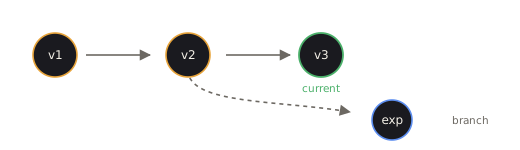
Kamembert lays your versions out as a graph of parent to child. For collections it did not create itself, it has to guess the parent of each version: by default that is the previous version by date, unless an earlier one is clearly more similar (measured by how many files of the same name and size they share), in which case it links to that one instead. You can re-parent any version by hand if the guess is wrong, and switch between a List and a Graph view.
What you can do with a version
| Action | What it does |
|---|---|
| Compare | Run the Compare view between a version and its parent to see same, changed, and only-in-one. |
| Changes | A git-style list of every changed file versus the parent, with text diffs and an ignore-whitespace option. |
| Branch | Copy a version into a new child to start a separate line of work, without touching the original. |
| Tag & label | Give a version a name, a description, a tag, and the authoritative version number you choose. |
Reclaiming space, safely
The point of all this is to shrink old versions you want to keep around but are not actively using. Two options, both reversible:
- Archive zips a version's folder, verifies the zip opens and holds the right number of files, and only then moves the original folder to the Recycle Bin. Extract puts the folder back. The version keeps its correct size and file count in the graph the whole time, read straight from the zip.
- Make patch stores only what changed versus the parent: text files as line patches, modified binaries and new files in full. Each text patch is verified to rebuild the new file exactly, or it falls back to a full copy. The folder then goes to the Recycle Bin, and Restore rebuilds it from the parent plus the patch.
A folder is only ever recycled after its zip or patch is written and verified, and these jobs run in the background. Nothing is overwritten, and a half-written archive never replaces a good one.